
 Web Development
 APP Development
 CRM Development
 Digital Transformation
 Generative AI
 QA Testing & Automation

Pick any fast, modern web app you use daily. Chances are React is running under the hood. This is not something that happened by accident. When Facebook’s engineering team released React back in 2013, they were solving a very specific internal problem: How to build a UI(User Interface) that updates continuously without making the whole page feel sluggish? That problem turned out to be universal, and every development team building at scale eventually runs into it.
 Businesses searching for reliable ReactJS development services keep landing on React for the same reasons. It does not slow down when things get complicated. It does not become a nightmare to maintain as new features pile on. Growth does not break it.
The survey, Stack Overflow Developer Survey 2024, found that more than 40% of professional developers work with React.js, making it the most-used web framework for three years in a row. Those numbers do not lie.
Virtual DOM for Faster Rendering in React.js Web Development
To understand why React is fast, you first need to understand the problem it was solving.
Browsers work with something called the DOM (Document Object Model ), which is basically the live structure of everything visible on a webpage. Every paragraph, every image, every button lives in the DOM. The problem is that touching the DOM is slow. When older frameworks updated the page, they often re-rendered large chunks of it, even when only one small thing changed. On a simple blog, nobody notices. On a live dashboard with constant data updates, it becomes a serious problem.
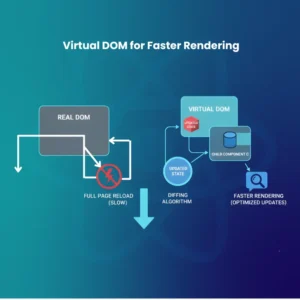
React introduced the Virtual DOM to solve this. Before making any change to the actual page, React works with a virtual copy of it stored in memory. It makes the update there first, then compares the new version to the old one, identifies exactly what is different, and only then applies those specific changes to the real page. This comparison step is called diffing.
Think of it like editing a spreadsheet with a thousand rows. You changed one cell. An old system highlights the whole sheet and recalculates everything. React finds that one cell and updates only that.
| Traditional DOM | React Virtual DOM |
| Re-renders large sections on any update | Targets only what actually changed |
| Performance drops as the application grows | Stays consistent regardless of app size |
| Heavy browser workload | Minimal, memory-efficient operations |
| Users notice lag under heavy interaction | UI stays smooth even with frequent updates |
Netflix is a practical case worth looking at. Their homepage refreshes recommendations, continues-watching rows, and trending content constantly. All of that happens while you are actively browsing. The Virtual DOM is what keeps the experience from feeling like it is constantly reloading.
Component-Based Architecture in ReactJS App Development
Most codebases, as they grow, turn into something nobody wants to touch. One change in one file breaks something in a completely different part of the app. Nobody knows why. Eventually, people are afraid to update anything.
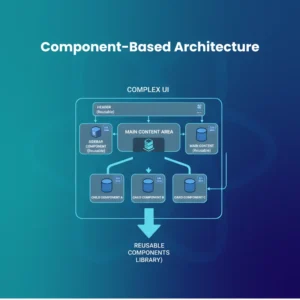
React’s component model is a direct answer to that problem. Instead of writing your application as a single connected mass of code, you build it as a collection of independent, reusable pieces. Each component owns its own markup, logic, and its own state. The header does not know what the footer is doing. The user profile card is not concerned about the checkout flow.
This isolation is what makes React applications manageable at scale. Teams can work in parallel on different components without stepping on each other. Bugs are contained. Testing is straightforward because each piece can be tested on its own.
“Component architecture is why React codebases age well. Most frameworks get harder to work with over time. React actually gets easier as your patterns mature”, as engineers who have maintained large React applications frequently observe.
Airbnb is a strong real-world example. Their platform has dozens of moving parts: listing cards, the search bar, the interactive map, the booking form, and the review section. Each is its own component. When Airbnb redesigned its listing page a few years back, its engineers updated that component, and nothing else on the platform was affected. That kind of surgical precision only happens with a component-based system.
For teams that want to hire React developers for a product they plan to scale, this architecture is what separates a project that grows gracefully from one that becomes impossible to maintain.
Efficient State Management in ReactJS Development Services
Every web application needs to remember things. Which user is signed in, which products are in the cart, which tab is active, and what filters are applied. All of that is state. Managing it well is the difference between an app that feels responsive and one that feels broken.

React gives developers a toolkit that scales with the complexity of the project:
- useState and useReducer handle state that belongs to a single component
- Context API works when multiple components in the same tree need access to shared data
- Redux is the tool for large applications where dozens of components depend on the same global state
- Zustand and Recoil sit between Context and Redux, offering global state without the Redux setup overhead
The critical performance benefit here is selective re-rendering. React does not update the whole application when the state changes. It updates only the components affected by that specific change. If someone adds an item to their cart, the cart icon updates. The navigation bar, the product listings, and the footer all stay exactly as they were.
Picture a Jira-style issue tracker. A developer drags a ticket from the “In Progress” column to “Done.” Only those two columns re-render. The sidebar, the top navigation, the filter panel, and the other columns: none of them move. That is React’s state management doing exactly what it is supposed to do.
Unidirectional Data Flow for Cleaner React Development
React has an opinion about how data should move through your application: downward. A parent component passes data to its children. Those children can display it or use it, but they cannot reach back up and change it directly. If something needs to be updated, the signal goes back up through functions, and the parent decides what to change.

This constraint frustrates some developers when they first encounter it. Over time, most of them come to appreciate it deeply.
When data can travel in any direction, tracking down the source of a bug becomes guesswork. Something changes, something else breaks, and nobody can immediately explain the chain of events. With one-way flow, the path is always clear. Data has a single origin. Updates happen in a predictable sequence. You can trace any problem back through an obvious chain.
What teams actually gain from this:
- Debugging takes minutes instead of hours because the data chain is visible
- New developers joining the team can read the code and understand the data flow quickly
- Code reviews are faster because reviewers can follow what is happening without deep context
- Applications behave consistently, which makes testing much more reliable
This same data flow pattern carries directly into React Native. So when a business needs to hire React Native developers for a mobile product, the mental model the web team already uses applies without understanding everything from scratch.
Rich Ecosystem and Libraries in React.js Development Agency Projects
React by itself is a focused tool. It handles one thing: building user interfaces. The reason it gets so much done is everything the community has built around it.
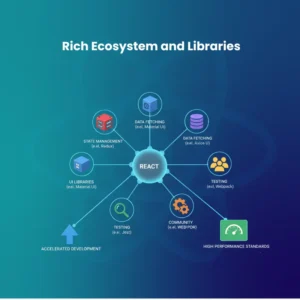
| Tool | Purpose |
| Next.js | Server-side rendering, static generation, built-in SEO |
| React Router | Navigation and routing for single-page apps |
| Redux / Zustand | Global state management at any scale |
| Material UI / Tailwind CSS | UI components and utility-based styling |
| React Query | Server state, data fetching, and cache management |
| React Native | iOS and Android apps using React patterns |
Businesses working with React
For any business working with a React Native App Development Agency or a React Native Development Company, this ecosystem removes a major challenge: your web team and your mobile team are no longer speaking different languages. The component patterns transfer. The state management tools transfer. The overall mental model transfers.
Instagram’s mobile app was built with React Native. The team at Meta shared a significant portion of the business logic between the iOS and Android versions. That meant less duplication, fewer bugs, and a much smaller team needed to maintain both platforms simultaneously.
Choosing a React.js development agency with deep ecosystem knowledge means you are not just getting someone who knows React. You are getting a team that knows which tools to reach for and which ones to avoid, based on experience building production products.
React.js vs Next.js: Which One Does Your Project Actually Need?
This comes up in almost every initial scoping conversation, and it is worth addressing clearly.
React.js and Next.js are not competing technologies. Next.js is a framework built directly on top of React. It takes everything React.js does and adds a layer of capabilities that React deliberately left out: server-side rendering, static site generation, file-based routing, built-in API routes, and image optimization.
The simplest way to frame it: React gives you the building blocks. Next.js gives you a finished construction system with the blocks already organized.
| Feature | React.js | Next.js |
| Default rendering | Client-side only | SSR, SSG, and ISR are all available |
| SEO capability | Requires manual configuration | Built in from the start |
| Routing system | React Router, set up manually | File-based, automatic |
| Backend API | Not included | API routes built in |
| Best use case | SPAs, admin panels, internal tools | Marketing sites, eCommerce, and content platforms |
| Setup complexity | Flexible, requires decisions | Opinionated, faster to start |
The decision usually comes down to one question: do your users arrive through search engines? If yes, Next.js is almost always the right call. Server-rendered pages load faster, rank better, and give you control over metadata in ways that client-side React alone cannot match easily.
If your application lives behind a login and users come to it directly, standalone React gives you more flexibility without the overhead of a full framework.
“The mistake teams make is treating this as a React.js versus Next.js debate. It is really a rendering strategy debate. Once you know how your users find and use your product, the answer usually becomes obvious”, as experienced engineers at React.js development agencies often explain to clients during project discovery.
The official Next.js docs and React documentation both lay out their intended use cases clearly and are worth reading before making the final call.
Conclusion
React has been around long enough now that its staying power speaks for itself. Frameworks come and go. React.js keeps being the answer because it actually works at scale, in production, for teams of real sizes. The Virtual DOM handles rendering performance. The component model handles code complexity. The ecosystem handles everything else.
For businesses serious about building something that holds up as it grows, partnering with an experienced React.js web development company is the practical choice that tends to pay for itself quickly.
People Also Ask About React.js Development
What is React.js used for in real projects?
React.js is used to build the user-facing side of web applications. Everything you see and interact with on sites like Facebook, Airbnb, and Atlassian products is rendered through React. It handles dynamic content, complex UI logic, and large-scale data-driven interfaces well.
Can React.js handle enterprise-level applications?
It handles them better than most alternatives. The component model keeps large codebases organized. The ecosystem provides tools for every complexity level. Uber, Walmart, and LinkedIn all use React in their core products.
What is the right time to hire React developers versus React Native developers?
Hire React developers for web applications. Hire React Native developers when you need iOS or Android apps. Many agencies offer both because the knowledge set overlaps significantly, which is worth asking about upfront.
How is React different from React Native?
React renders to the browser DOM and produces web applications. React Native renders to native mobile components and produces iOS and Android apps. The programming model is similar, but the output is entirely different.