 Web Development
 APP Development
 CRM Development
 Digital Transformation
 Generative AI
 QA Testing & Automation
Most US businesses ask the same question before committing: Is cloud migration actually going to help us, or are we just paying for a trend?
Honest answer? It depends on how you do it. But the data leans heavily in one direction. Cloud migration is now the number-two IT priority for CIOs in 2026, just below cybersecurity. According to my rough estimate, the US market hit $4.8 billion in 2025 and is growing at 22.1% annually through 2035. Companies aren’t spending that money by accident.
I’ve seen businesses cut IT overhead by more than 40% after a well-planned cloud migration. And I’ve seen others spend six months fixing mistakes they made by rushing it. This guide is for the people who want to be in the first group.
What Is Cloud Migration in Cloud Computing?
Cloud migration in cloud computing means moving your applications, data, and IT systems off local servers and into a cloud environment. Simple enough on paper.
In practice, it’s a lot more than copying files to a new location. You’re changing where your systems live, how they talk to each other, and how your team accesses everything. Some companies move everything at once. Others keep parts of their infrastructure on-premises and shift the rest. Both approaches work. It depends on your data, compliance requirements, and how much risk your business can absorb.
The signal that it’s time to migrate to the cloud is usually one of two things. Either your current setup can’t keep up with your growth. Or you’re spending too much maintaining hardware that’s holding you back.
Cloud Migration Strategy: The Foundation You Cannot Skip
Before you move anything, you need a cloud migration strategy. That sounds obvious. But most failed migrations happen because teams skipped this step or rushed through it.
The most widely used framework is called the 6 Rs. Here’s what each one actually means:
| Strategy | What It Means | Use This When |
| 1- Rehost (Lift and Shift) | Move apps to cloud as-is | You need speed more than optimization |
| 2- Replatform | Small changes during the move | You want improvement without a full rebuild |
| 3- Repurchase | Replace with a SaaS product | You’re running outdated legacy software |
| 4- Refactor | Rebuild for cloud-native architecture | Long-term performance matters most |
| 5- Retire | Cut systems you no longer need | Cost reduction is the goal |
| 6- Retain | Keep certain systems on-premises | Compliance or latency requirements |
Pick the wrong one, and you add months to your timeline. Pick the right one, and the whole thing moves faster than most teams expect.
7 Steps of Cloud Migration That Teams Actually Follow
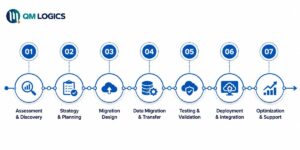
Good cloud migration service providers don’t improvise. They follow a structured process. Here’s how the 7 steps of cloud migration look when executed properly:
- Assessment and Discovery: Figure out exactly what you’re working with. Every application, every database, every integration. Don’t skip this.
- Set Clear Goals: What does success look like? Define it before the move starts. Faster load times, lower maintenance costs, specific uptime targets. Get specific.
- Pick Your Cloud Model: Public cloud (AWS, Azure, Google Cloud), private cloud, or hybrid cloud migration; each carries different trade-offs. There’s no universal right answer.
- Design the Target Environment: Build where you’re going before you start moving things. Don’t migrate into a space you haven’t mapped.
- Plan Cloud Data Migration: This is the hard part. Cloud data migration requires mapping your data sources, defining security controls, and planning exactly how you’ll validate that nothing got lost or corrupted.
- Move in Phases: Never migrate everything at once. A phased approach keeps operations running and reduces damage if something goes wrong.
- Test Everything Post-Migration: This gets skipped more than any other step. It shouldn’t. Measure every outcome against the goals you set at the beginning.
Cloud Migration Strategies That Work in the Real World
Here’s the real difference between companies that get cloud migration right and those that struggle with it. The ones who win treat it like a program, not a one-time project.
Netflix moved to Amazon Web Services over several years. They used a phased rehost strategy and didn’t try to do everything at once. That cloud migration is now one of the most referenced success stories in the industry. Global scale, zero data center dependency, and they didn’t break production doing it.
General Electric moved over 9,000 workloads to the cloud using a mix of replatform and refactor strategies. Faster deployment and a measurable drop in operating overhead were the outcomes. Not slide deck claims. Operational results.
“Moving to the cloud is not a technical decision. It’s a business decision that happens to involve technology.” That framing matters because it keeps the focus where it belongs.
Hybrid Cloud Migration: The Smarter Middle Ground
Hybrid cloud migration keeps some workloads in a public cloud while others stay on-premises or in a private cloud. You get flexibility without forcing a full cutover on day one.
More than 75% of organizations are expected to run hybrid cloud strategies by 2027. Healthcare companies use this model heavily. Patient records stay in private environments for HIPAA compliance. Billing, analytics, and scheduling run in the public cloud. The architecture reflects the actual risk profile of the data, not just what’s technically possible.
If your business has compliance requirements or systems with strict latency tolerances, hybrid cloud migration is likely your starting point, not a fallback option. If you are seeking experts for this, then you can contact QM Logics
Cloud Migration Tools You Should Know
Tools matter. The right ones cut risk and shorten your timeline. Here’s what most enterprise cloud migration teams actually rely on:
- AWS Migration Hub: Tracks everything across AWS services from one place. Strong choice for organizations already in the AWS ecosystem. (https://aws.amazon.com/migration-hub/)
- Azure Migrate: Microsoft’s discovery and assessment tool for moving to Azure. Works well for Windows-heavy environments. (https://azure.microsoft.com/en-us/products/azure-migrate)
- Google Cloud Migrate for Compute Engine: Handles VM migration to GCP with minimal disruption to running services.
- CloudEndure Migration: Continuous block-level replication with automated cutover. Ideal for AWS migrations where downtime is not acceptable.
- Carbonite Migrate: Good fit for mid-market businesses needing server and workload migration without a long downtime window.
Before signing with any cloud migration company, ask which tools they use and why. If they can’t answer that question confidently, keep looking.
Benefits of Cloud Migration for US Enterprises
The numbers make this straightforward.
81% of enterprises see lower operational costs within the first year after migrating. 78% reduce IT costs by 20 to 50 percent within two years. Post-migration data shows a 32% jump in operational efficiency and 35% less downtime on average. Cloud analytics delivers 30% faster decision-making compared to running everything on-premises.
And then there’s scale. Cloud infrastructure grows with your business. You don’t buy hardware for demand that might not show up. You pay for what you actually use.

Security gets underestimated in this conversation. AWS, Microsoft, and Google spend billions annually on security infrastructure. Most mid-size enterprises can’t get close to that level of protection by running their own servers. Migrating is often a security upgrade, not a security risk.
Cloud migration sits at the center of any serious digital transformation plan. Companies treating it as optional are making a competitive decision, whether they realize it or not.
Cloud Migration Challenges and How to Handle Them
Nobody talks about this part enough. Cloud migration fails sometimes. Not always, but often enough that you should go in with a clear picture of where it goes wrong.
Cloud Data Migration: Where Most Projects Hit a Wall
Cloud data migration is where timelines slip, and budgets stretch. Moving data from legacy systems to cloud environments sounds straightforward. It’s not.
You’re dealing with extraction, transformation, transfer, validation, and reconciliation, all while keeping your business running. 40% of cloud migrations face delays specifically because of data complexity. The reasons are usually the same:
- Security gaps during transfer, especially for regulated industries
- Legacy applications that weren’t built to run in cloud environments
- Underestimated workload complexity that blows the budget
- Internal teams without the skills to execute at the required pace
The fix starts with a formal readiness assessment before migration begins. Organizations that skip it are far more likely to blow their budget and miss their timeline. That’s not a prediction. It’s what the data shows consistently across industry reports.

Cloud migration consulting services exist for exactly this reason. You bring in people who’ve done this before, and you don’t pay for their learning curve.
At QM Logics, software development projects are built with cloud-readiness as part of the architecture from the start. Not as something you deal with later.
How to Choose the Right Cloud Migration Service Provider
Most companies make one of two mistakes. They go with the cheapest option, or they assume the biggest name means the best result. Neither is a strategy.
Before choosing a cloud migration service provider, ask these questions:
- Do they have real case studies from your industry, not just logo slides?
- Which platforms do they actually specialize in? AWS cloud migration, Azure, or Google Cloud?
- How do they handle cloud data migration compliance requirements?
- What does post-migration support look like? Included or billable?
- Will they give you a milestone plan with clear accountability at each stage?
A good provider asks more questions than they answer in the first meeting. They want to understand your environment before they tell you what it needs. If they’re pitching before they’re listening, find someone else.
QM Logics approaches every infrastructure and software engagement with that same standard. Understand the problem first. Then solve it.
Conclusion
Cloud migration isn’t something you plan for eventually. The US market is growing at 22% annually. The businesses pulling ahead right now already have cloud infrastructure in place or are actively building it.
The difference between a migration that delivers results and one that creates new problems comes down to how seriously you treat the planning phase. Strategy, tooling, and choosing the right cloud migration service provider matter more than most teams realize before they start.
Read our piece on digital transformation strategy to see how cloud migration fits into a broader operational shift. Or go straight to QM Logics and let’s map out what your specific migration actually looks like.
Frequently Asked Questions
What Is AWS Cloud Migration?
AWS cloud migration is moving your applications, data, and workloads to Amazon Web Services. AWS offers its Migration Hub to manage and track the entire process from a single dashboard. It supports every major migration strategy, from lift-and-shift to full cloud-native refactoring. For US enterprises, AWS is the most common destination for cloud migration, largely because of its global infrastructure and the depth of its tooling.
What Are the Cloud Migration Steps?
The core cloud migration steps are: assess your current environment, set measurable goals, choose your cloud model, design the target architecture, plan cloud data migration in detail, execute in phases, then test and optimize post-migration. The two steps most commonly skipped are the upfront assessment and post-migration testing. Both are expensive mistakes.
What Is Cloud Data Migration?
Cloud data migration is moving data from on-premises databases or legacy systems into cloud-based storage environments. It involves extraction, transformation, secure transfer, validation, and reconciliation. For businesses in healthcare, finance, or legal services, compliance requirements add a significant layer of complexity to how data can move and where it can land.
How Long Does Cloud Migration Take?
For an enterprise, the average cloud migration runs around 8 months from initial assessment to stabilization. Smaller businesses can complete theirs in 4 to 6 weeks. Legacy system complexity and total data volume are the two biggest timeline factors. Organizations that invest in proper readiness assessments upfront consistently finish faster than those that skip that phase.
What Is Hybrid Cloud Migration?
Hybrid cloud migration is moving some workloads to a public cloud while keeping others on-premises or in a private cloud. It gives you scalability where you need it and control where compliance demands it. For many enterprises in regulated industries, hybrid isn’t the compromise option. It’s the right option from the start.