 Web Development
 APP Development
 CRM Development
 Digital Transformation
 Generative AI
 QA Testing & Automation
Ever tried to figure out how to develop an API and ended up with 10 browser tabs open, none of them agreeing with each other? You’re not the only one. Most businesses hit a wall – the moment their apps, websites, and internal tools need to actually talk to one another- and that’s the exact moment api development services stop being a nice-to-have and start being the thing keeping your operations from falling apart. An API, or Application Programming Interface, is simply the bridge that lets separate pieces of software exchange data without you manually shuffling files between them.
I’ve sat across from founders and IT managers at QM Logics who came to us after an in-house attempt at building an API left them with slow load times, exposed data, or a connection that snapped every time a vendor pushed an update. That’s the real problem custom api development services are built to fix. Not a shinier version of what you already have, but something structured enough to grow instead of buckle.
This guide covers what you need before you hire api developers, what a serious api development company should actually deliver, and how testing and upkeep work once the thing is live. It’s based on projects we’ve shipped, not theory.
What API Development Actually Means for Your Business
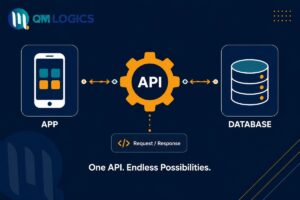
API development is the work of designing, building, and keeping up the connection point where two applications swap data.
Picture a waiter at a restaurant. You don’t walk into the kitchen and grab your own plate. You tell the waiter, the waiter tells the kitchen, and the food comes back to your table. That’s what an API does between your app and a database, a payment processor, or someone else’s software entirely.
Different businesses lean on this for different reasons. A retail brand might need a custom API syncing inventory between an online store and a physical register. A clinic’s app might need a locked-down connection pulling patient records from a hospital’s system. A marketing team might rely on a Google Analytics developer api to feed traffic numbers into a private dashboard instead of logging into 5 tools every morning.
Here’s a quick look at the common types we get asked about:
| API Type | Best Used For | Example |
| REST API | Web and mobile apps, quick data exchange | An app checking live order status |
| SOAP API | Banking and legacy enterprise systems | Secure financial transactions |
| GraphQL API | Apps needing precise, flexible queries | A dashboard pulling only certain fields |
| Webhook-based API | Real-time event alerts | Payment confirmation triggers |
Knowing which one fits is step one, and it’s something we walk through with every client before touching any code. If you’re weighing this against a bigger rebuild, our piece on legacy application modernization is worth a look too.
How to Develop an API Without Wasting Months
People ask how to develop an api like there’s a shortcut hiding somewhere. There isn’t, but there is a difference between projects that go smoothly and ones that drag on for half a year. It usually comes down to planning before anyone writes code. I’ve watched projects stall not because the developers were bad at their job, but because nobody mapped the data flow first.
Start with the purpose and endpoints
Every custom api development project needs a clear list of what data has to move and where it’s headed. This becomes your endpoint map, and skipping it is how teams end up rebuilding half the project three weeks in.
Pick authentication that actually holds up
Whether it’s a web api development services build for internal use or something public-facing, this is where security either works or doesn’t. Token-based systems like OAuth 2.0 are the standard now for rest api development services because they limit access without handing out raw credentials.
Document as you build, not after
A properly documented API is one your team, or whoever you hire next year, can actually pick up without guessing. Versioning it (v1, v2, and onward) also keeps older integrations from breaking the moment you ship an update.
What to Look For in an API Development Company
Choosing an api development company isn’t just a pricing exercise. I tell clients to ask 3 things before signing anything.
- Does the company give you a real test environment before going live, not just a demo
- Will they document error codes and rate limits, or just hand you a working file and disappear
- Is there support after launch, since most API problems only show up once real users start hammering it
A solid api development and integration services provider will be upfront about timelines too. If someone promises a fully custom API in 2 days, that’s not confidence, that’s a red flag.
Real example: One client, a logistics company expanding into 3 new states, needed an api development service that could sync shipment tracking across 5 separate carrier systems. Their previous developer had built 5 disconnected pipelines that drifted out of sync constantly. We folded everything into one custom API layer, and their tracking-related support tickets dropped by more than half within a month.
Our Approach to Custom API Development Services
At QM Logics, custom api development services cover the whole lifecycle, not just the initial build and a handshake.
Discovery and architecture planning
Discovery and architecture planning come first. We map your existing systems before writing anything, so the API fits your stack instead of forcing a rebuild around it.

REST and GraphQL development
REST and GraphQL development happens depending on what your data actually needs. Some projects call for straightforward REST API development services; others need GraphQL because the app requires flexible, nested queries rather than one-size-fits-all responses. The GraphQL foundation site is a decent reference if you want the technical rundown.
Third-party integrations
Third-party integrations are where most of the daily friction lives, whether that’s wiring in an email API service for developers, connecting a payment processor, or pulling numbers from a Google Analytics developer API for internal reporting.
Ongoing maintenance and scaling
Ongoing maintenance and scaling don’t stop at launch. As your user base grows, the API needs monitoring, load testing, and the occasional refactor so it doesn’t slow down under real traffic. This ties closely into the kind of work we outline on our cybersecurity consulting page, since scaling and security tend to move together.
Client Review: One ecommerce client put it simply after we wrapped their integration: “We didn’t realize how much manual work our team was doing until the API removed it.” That’s the kind of feedback that tells us we fixed an actual daily headache, not just checked a technical box.
Testing an API Properly Before It Goes Live
Testing is the part that gets rushed more than anything else, and it’s usually the first thing that comes back to bite teams. Before launch, an API needs functional testing, load testing, and security testing, in that order.

If you’re hunting for Free API testing tools on your own, Postman is still one of the most widely used for manually checking endpoints while you build. For teams wanting faster feedback, automated API testing online through a CI pipeline catches problems before they ever touch a live environment.
Our api integration services include a dedicated QA pass using an API Tester setup that mimics real traffic patterns instead of isolated single requests. This is how we catch things like rate-limiting failures or timeout errors that only surface under actual load, long before a customer ever notices.
Real Problems We’ve Solved With API Development
A subscription box company came to us because their billing platform and shipping software weren’t communicating. Orders were getting charged but not always flagged for shipment, which snowballed into a pile of refund requests. We built a custom API bridge between the two systems with automatic error logging, and the mismatch nearly disappeared within one billing cycle.
A B2B software client needed to pull usage numbers from a google analytics developer api and merge them with their own internal metrics for client reporting. Instead of someone manually exporting spreadsheets every Friday, we built an automated pipeline that updates their dashboard daily on its own.
These aren’t rare cases. This is what daily operations look like for businesses running on systems that don’t talk to each other, and it’s exactly the gap api development services are meant to close.
Conclusion
Picking the right partner for api development services really comes down to finding a team that treats your API as something that needs to last, not a one-time delivery you never hear from them again about. If you’re ready to get your systems actually talking to each other, our team at QM Logics can walk you through a free discovery call and map out what your setup actually needs. You can also browse our full services page or reach out directly through our contact page to get started.
Frequently Asked Questions
How long does custom API development usually take?
Most projects run four to ten weeks depending on how many integrations are involved and how complex the data exchange gets.
Do I need a brand new API if mine already works?
Not necessarily. Sometimes it just needs better documentation, tighter security, or performance tuning instead of a full rebuild.
What’s the actual difference between API development and API integration?
Development is building the connection point itself. Integration is plugging that API, or someone else’s, into your existing workflow.
Can a small business actually benefit from custom API development services?
Yes, even a small store benefits from automating inventory syncing or linking a CRM, which saves hours of manual entry every week.
Should I go with REST or GraphQL?
REST fits most standard apps fine. GraphQL makes more sense when your app needs very specific, nested data without over-fetching.