 Web Development
 APP Development
 CRM Development
 Digital Transformation
 Generative AI
 QA Testing & Automation
A developer I worked with last year described his old release process in one sentence: “We’d merge everything Thursday night and pray.” That’s not a CI/CD pipeline. That’s a coin flip with extra steps.
CI/CD is short for Continuous Integration and Continuous Delivery/D, sometimes Continuous Deployment. In plain English, it’s the system that takes a code change, tests it, builds it, and gets it out the door, without a human manually babysitting each step.
What is CI/CD really solving? The gap between “code works on my machine” and “code works in production.” That gap is where most outages start.
I’ve watched teams go from dreading deploy day to barely noticing it happens. The difference wasn’t talent. It was a pipeline that actually did its job.
What Is a CI/CD Pipeline (And Why “Automated” Doesn’t Mean “Set and Forget”)
A CI/CD pipeline is a sequence of automated checkpoints. Code goes in one end. Something either ships or gets rejected on the other end. Simple in concept. Messy in the details, which is where most teams trip up.
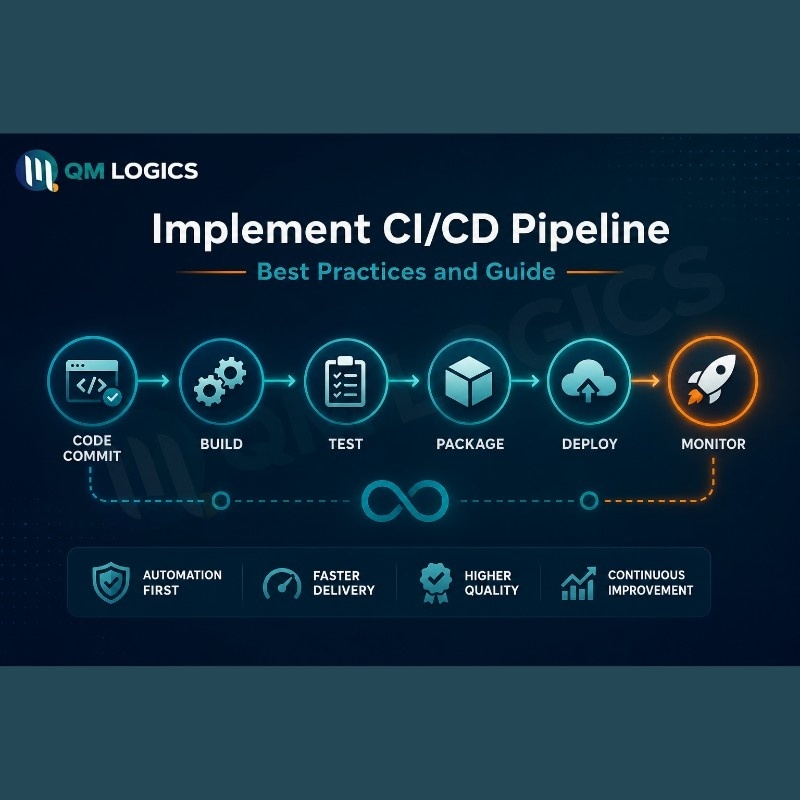
A basic Git CI/CD pipeline usually runs through this order:
- Developer pushes a commit
- Pipeline pulls the latest code, installs dependencies
- Automated tests run
- A build gets packaged, often into a container
- Security and quality scans check the build
- Passing builds move to staging, then production
That last step splits into two very different philosophies, and people mix them up constantly.
Continuous Integration is the testing stage. Small commits, tested fast, so bugs get caught while they’re cheap to fix.
Continuous Delivery means the code sits ready to release, but a human still hits the button. Continuous Deployment skips that button entirely. Anything that clears the pipeline goes live, no approval needed.
Which one fits you depends on what you’re building. A team shipping a mobile game can probably run full Continuous Deployment without much risk. A team handling payment data usually keeps a human in the loop, so Continuous Delivery makes more sense there.
CI/CD Pipeline Security: The Part Everyone Skips Until Something Breaks
Here’s an uncomfortable fact. Your pipeline probably has more access than half your engineering team. It can touch your cloud accounts, your source code, sometimes your production database directly. And most teams still treat it like background plumbing instead of the high-value target it actually is.
Real Incident: In 2025, someone proved this the hard way. A widely used GitHub Action got compromised when attackers quietly repointed its version tag to malicious code. It sat there pulling secrets out of an estimated 23,000 repositories before anyone caught it. No dramatic hack. No brute force. Just a pipeline that trusted a tag it shouldn’t have.
The OWASP CI/CD Security Cheat Sheet is worth bookmarking if you’re serious about locking this down. It’s blunt about why this matters: pipelines are appealing targets precisely because of how much they can touch.
So how do you secure CI CD pipelines effectively without slowing everything to a crawl?
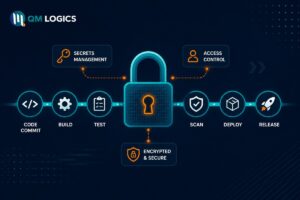
Start with secrets. Never hardcode API keys into a config file. Ever. Use a real secrets manager, and give each job only the access it needs for that job. Your unit test runner doesn’t need your production deploy key. It really doesn’t.
Then look at your access model. Service accounts quietly collect permissions over time, way more than any human account would, because nobody reviews them the way HR reviews a person changing roles. Set a recurring audit. Strip what’s unused.
Last, watch your dependencies. Pin them to a commit hash, not a version tag, because tags move and hashes don’t. That single habit would’ve stopped the 2025 incident above. Also block pipelines from auto-running on pull requests from forks. That’s one of the easiest ways attackers slip poisoned code in without touching your main repo at all.
Quick reference if you want the short version:
| Risk | Fix |
| Leaked secrets in config files | Dedicated secrets manager, scoped per job |
| Over-privileged service accounts | Recurring access audits, least privilege by default |
| Mutable dependency tags | Pin to commit hash |
| Poisoned pull requests from forks | Block auto-run on fork PRs |
Picking CI/CD Pipeline Tools: Jenkins, GitHub, GitLab, AWS, Azure
There’s no single best CI CD pipeline tool, no matter what a listicle title tells you. The right pick depends on where your code already lives and how much infrastructure babysitting your team is willing to do.
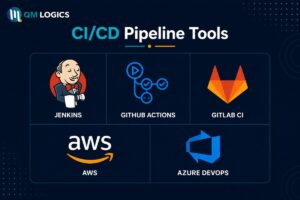
GitHub CI/CD, through GitHub Actions, wins on speed. If your repo’s already on GitHub, you can have a working pipeline running in under an hour, pulling from thousands of prebuilt community workflows.
GitLab CI/CD takes the opposite bet. It bundles source control, CI/CD, container registry, and security scanning into one platform. Fewer moving pieces to manage, at the cost of a slightly longer setup if you’re new to GitLab.
Jenkins is still around for a reason. Complex, on-premise, highly custom pipelines still lean on it heavily. But it comes with the heaviest maintenance load of the group, and that cost is easy to underestimate until you’re three years in and nobody remembers how half the plugins were configured.
For teams already deep in a cloud provider, an AWS CI CD pipeline through CodePipeline plugs natively into Lambda and ECS. An Azure CI CD pipeline through Azure DevOps does the same for teams standardized on Microsoft’s stack. Neither makes much sense if you’re not already living in that ecosystem.
I usually tell clients the same thing: pick whatever platform already hosts your code. Fighting that gravity just adds friction nobody asked for. At QM Logics, our QA testing and automation work runs across GitHub Actions, GitLab CI, and Jenkins depending on what a client’s stack already looks like, not what we’d prefer to use.
GitHub CI/CD vs GitLab CI/CD, the Real Difference
GitHub CI/CD is faster to start. GitLab CI/CD is more complete once you’re running. That’s really the whole comparison, once you strip away the marketing language both companies use.
DevOps CI/CD Pipeline Best Practices That Actually Change Outcomes
A few habits separate a pipeline your team trusts from one people quietly work around.
- Keep builds fast. A 45-minute build defeats the entire purpose of CI/CD, which is fast feedback. If your builds are that slow, something’s wrong with the design, not the team’s patience.
- Fail loud and fail immediately. A broken build should block the merge right then, not surface two days later buried under three more commits.
- Version your pipeline config like actual code. Review it. Don’t let it live as tribal knowledge that only one engineer half remembers.
- Test at every stage, not just the last one. An issue caught at build time is cheap. The same issue in production is a fire drill.
- Use feature flags. They let code ship to production invisibly, no user seeing it yet, which takes the pressure off release day almost entirely.
Good CI/CD design also scales down, not just up. A 5-person startup doesn’t need the layered approval gates a 200-person company needs, and building for scale you don’t have yet just slows everyone down for no reason. This kind of thinking usually overlaps with broader digital transformation strategy work, especially for companies untangling a legacy release process that’s grown unmanageable.
CI/CD vs. Agile
CI/CD vs Agile comes up a lot, and honestly it’s not a real competition. Agile shapes how a team plans work in short cycles. CI/CD is the machinery that makes those cycles actually shippable. You can plan 2-week sprints all you want, but without a working pipeline, “ship at the end of the sprint” turns into a manual scramble every single time.
A CI/CD Pipeline Example From Actual Work
Here’s a Git CI/CD pipeline example that’s close to real projects I’ve seen. A mid-size SaaS company running Node.js. A developer pushes to a feature branch. That triggers a GitHub CI/CD workflow: install dependencies, run unit tests, build a Docker image. Once the pull request gets approved, a GitLab-style deployment stage automatically pushes that image to staging. A manual gate handles the final push to production.

At QM Logics, we’ve moved a handful of clients off weekly manual releases onto pipelines like this, using GitHub Actions, GitLab CI/CD, or Jenkins depending on what they already had running. One client’s comment stuck with me. He said his team stopped dreading release day because the pipeline started catching the mistakes that used to slip straight through to production. That’s the actual point of all this. Not the tooling. The trust it builds.
Teams building AI-heavy products run into the same wall, just faster. We wrote about this in how AI is reshaping SaaS development, and the pattern holds here too. Faster iteration only works if the pipeline underneath can actually keep pace, which is something worth mapping out early in any software development project, not bolted on after the fact.
Conclusion
CI/CD isn’t a big tech luxury anymore. It’s the baseline for shipping software without wearing your engineers down in the process. Get the security right, pick tools that match your actual stack instead of the trendiest option, and build habits around fast feedback rather than chasing some mythical perfect pipeline that never actually ships.
If your pipeline has quietly become something nobody fully trusts anymore, that’s usually a sign it needs an audit, not a rebuild from zero. QM Logics works with US-based teams on exactly this. Feel free to get in touch or look through our services if you want another set of eyes on your current setup.
Frequently Asked Questions
What is CI/CD pipeline, in one sentence?
An automated chain of steps that builds, tests, and ships code every time someone pushes a change, instead of relying on someone to remember to do it manually.
Is CI/CD part of DevOps?
Yes, it’s one of the core technical pieces that makes DevOps culture actually functional day to day.
Which CI/CD tool should a small team start with?
GitHub Actions or GitLab CI/CD, in most cases. Both are managed, so you skip the maintenance headache that comes bundled with self-hosted Jenkins.
How often should a pipeline run?
Every commit, every pull request. Batching changes just delays when you find out something’s broken.
Can a CI/CD pipeline actually get hacked?
Yes, and more often than people think. It holds real credentials. Least-privilege access and dependency pinning aren’t optional extras here.