 Web Development
 APP Development
 CRM Development
 Digital Transformation
 Generative AI
 QA Testing & Automation
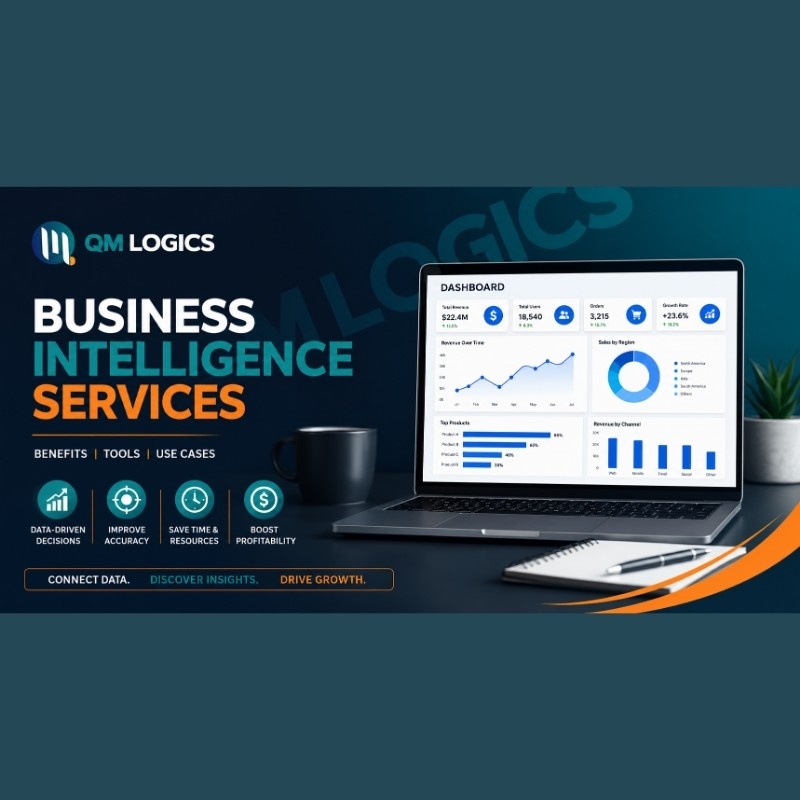
You already know the feeling. Someone in a meeting asks, “How are we doing this quarter?” and three people give three different numbers, pulled from three different spreadsheets. That’s not a data problem. That’s a missing business intelligence problem.
Business intelligence services take the numbers already sitting inside your CRM, your accounting software, your website, and your sales channels, and turn them into one dashboard everyone trusts. I’ve sat in those meetings. I’ve watched teams argue over whose spreadsheet is “right” instead of just looking at a screen and moving on. That’s the exact gap business intelligence services close.
This guide covers what business intelligence actually is, which business intelligence tools are worth using right now, how artificial intelligence in business is changing the game, and what to check before hiring anyone for business intelligence consulting services. Real examples throughout, not textbook definitions.
What Is Business Intelligence, Really?
What is business intelligence? In plain terms, it’s the process of pulling raw business data into one place and shaping it into something a person can act on in under a minute.
A business intelligence system connects your data sources, cleans the mess out of them, and displays what matters. No exporting. No formulas breaking every time someone edits a cell.
Here’s where most explanations go wrong. They make it sound like one big tool. It’s actually four separate jobs stacked together:
| Function | What It Answers | Example |
| Reporting | What already happened | Last month’s revenue, refund rates, traffic numbers |
| Monitoring | What’s happening right now | Live stock levels, open support tickets, today’s conversion rate |
| Analysis | Why it happened | Why churn jumped in March, why one product outsold the rest |
| Prediction | What happens next | Which customers are about to cancel, which SKU(Stock Keeping Unit) runs out first |
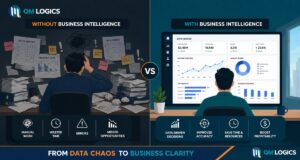
Most business intelligence and analytics services bundle all four into a single connected setup instead of four disconnected tools nobody remembers to check.
One more thing worth knowing early: Traditional reporting is a snapshot someone builds by hand once a week. A proper business intelligence dashboard updates itself, pulling fresh numbers from every connected source the moment you open it. If your “dashboard” is really just a spreadsheet someone updates on Fridays, you don’t have business intelligence yet. You have a habit.
Business Intelligence Examples That Actually Move Numbers
Theory is fine, but business intelligence examples are what convince people to actually build the thing. Here are three I’ve seen play out.
| Business Type | The Problem | The Fix | The Result |
| Online retailer | Checking five sales channels by hand every morning, guessing what to restock | Connected all channels and warehouse data into one retail business intelligence dashboard | Two-hour daily task dropped to under ten minutes; stockouts on top products fell by more than half in a single quarter |
| SaaS company | No visibility into which onboarding step was losing new users | Wired the signup funnel into a business intelligence platform | Drop-off point identified in week one; activation rates climbed noticeably within a month |
| Clinic group | Manually tallying no-show rates by hand each month | Simple dashboard pulling live data from the scheduling software | Found the exact reminder-timing issue causing spikes; fixed in an afternoon |
None of these needed enterprise-grade software. They needed someone actually to connect the existing data.
Business Intelligence Systems and Software: What’s Worth Using in 2026
Picking the right business intelligence software depends on your team size, budget, and how comfortable your staff already is with dashboards.
| Platform | Best Fit | Learning Curve |
| Power BI | Teams already inside the Microsoft ecosystem | Low to moderate |
| Tableau | Businesses needing deep, complex data visualization | Steeper |
| Looker | Teams already running on Google Cloud | Moderate |
| Oracle Business Intelligence applications | Large enterprises with multi-department, compliance-heavy data | High, often more than smaller teams need |
| Custom-built business intelligence system | Businesses whose workflows don’t fit a generic template | Depends on the build |
A few honest notes on each:
- Power BI, sometimes called Power Business Intelligence by teams already in that stack, is approachable and doesn’t demand a data science background.
- Oracle Business Intelligence applications are powerful but overkill for a 20-person company. I’ve watched smaller businesses buy in and barely use a third of what they paid for.
- A custom-built business intelligence system, shaped around how your business actually operates, tends to beat off-the-shelf software for logistics, healthcare, and SaaS companies running non-standard data structures. If a custom build is where you’re headed, our software development services team handles exactly this kind of integration work.
Enterprise Business Intelligence vs. What Small Businesses Actually Need
- Enterprise business intelligence usually means multiple departments, dozens of connected sources, and compliance requirements most small businesses will never touch.
- A smaller operation typically needs three or four data sources feeding one clean screen.
- The common mistake: small businesses buying enterprise-tier software, using ten percent of it, then abandoning the whole thing within a year because nobody had time to learn a system built for a company five times their size.
Retail Business Intelligence Deserves Its Own Mention
Retail is where business intelligence pays for itself fastest. A retail business intelligence setup tracks four numbers side by side:
- Foot traffic or site visits
- Conversion rate
- Average order value
- Inventory turnover
Put those four next to each other and patterns jump out that would otherwise take weeks of manual digging to spot. Cloud-based BI now holds over half the software market’s revenue share, and retail is a big reason why, since these businesses need numbers that update in real time, not once a week.
AI for Business Intelligence Isn’t Optional Anymore
AI for business intelligence used to be a future feature vendors teased in demos. It’s baked into most platforms now. Artificial intelligence in business intelligence tools handles:
- Anomaly detection
- Pattern recognition
- Plain-English queries (type “why did returns spike last month” and get an actual answer instead of building a report from scratch)
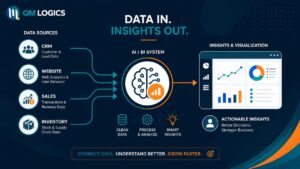
Industry research backs this up. Analysts at Mordor Intelligence point out that companies are shifting away from periodic reporting toward continuous intelligence pipelines, where data streams in and gets processed in seconds instead of sitting in a queue for days. The industry is replacing periodic reporting with continuous intelligence pipelines that stream data into cloud systems, cutting insight cycles from days to seconds.
That shift, from days to seconds, is the whole point. A business that spots a problem in real time can fix it before it costs money. One that finds out three weeks later is just doing damage control.
But here’s the part people skip: AI speeds up the analysis. It doesn’t replace the need for an actual business intelligence strategy. Somebody still has to decide which questions the business needs answered. Skip that step and jump straight into AI features, and you end up with dashboards full of numbers nobody trusts, because the data underneath was never cleaned or connected properly to begin with. If your business is exploring this alongside a bigger generative AI rollout, strategy has to come before tooling, every time.
Choosing Business Intelligence Consulting Services (Or Skipping Them)
Whether to build in-house or bring in business intelligence consulting services comes down to three things: timeline, existing technical staff, and how badly you need this working now versus eventually.
Signs you probably need outside help:
- Nobody on your team has built a data pipeline before
- Your numbers live across disconnected spreadsheets, a CRM, and a couple of random tools
- You need something live in weeks, not “sometime next quarter”
- Past attempts at in-house dashboards got abandoned within months
A solid business intelligence developer starts with discovery, not tools:
- Map where your data actually lives
- Identify which decisions the business needs to make faster
- Only then pick the software
Buy the platform first and figure out your needs later, and you’ll likely be rebuilding from scratch within a year. I’ve inherited exactly that kind of project more than once.
One of our QM Logics clients had already tried two internal dashboard builds using generic templates before reaching out. Their real problem wasn’t the software. Nobody had separated the numbers their operations team needed daily from the ones that only mattered at month-end. Once we mapped that out and built around their actual decision points, the dashboard went from something nobody opened to something checked every morning by default. Their ops lead told us afterward it finally showed them a problem “before it became one, not after.” You can see how we approach this kind of engagement on our services page, or request a quote if you want to talk through your specific setup.
Business Intelligence Reporting Tools vs. Dashboards: They’re Not the Same Thing
| Business Intelligence Reporting Tools | Business Intelligence Dashboards | |
| Format | Fixed snapshot | Live, continuously updating |
| Built for | A specific meeting or decision | Daily use |
| Update frequency | Manual, on request | Automatic |
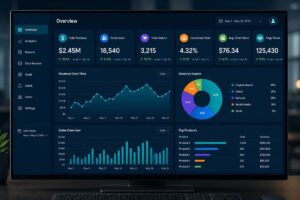
A dashboard that actually works has a few things in common:
- Five to seven metrics on the main screen, not twenty
- Clear separation between what needs attention today and what’s just for reference
- Mobile access, because most managers aren’t checking numbers from a desk
- Drill-down capability, so a summary number can be expanded when something looks off
- Automatic refresh, never a manual export
A business intelligence analyst usually owns the call on which metrics make the cut. Cram too much onto one screen and people stop opening it. Too little, and warning signs slip through unnoticed. The test I use: can a busy manager glance at it for fifteen seconds and know exactly where to focus that day? If not, it needs trimming.
If your dashboard strategy is tied into a broader systems overhaul, it’s worth reading through our take on digital transformation strategy as well, since BI rarely sits in isolation from the rest of your stack.
Conclusion
Business intelligence services were never about buying the flashiest software on the market. They’re about connecting data you already have, cutting the hours your team wastes rebuilding the same report every week, and replacing guesswork with an actual answer. Whether that means an off-the-shelf business intelligence platform or a custom-built business intelligence system, the payoff shows up the moment your team stops asking “what happened last month” and starts asking “what do we do next.”
For businesses across the USA weighing business intelligence and analytics services, the smartest first move is mapping your current data setup honestly before picking any tool. That one step saves more time than any dashboard feature ever will.
Frequently Asked Questions
What do business intelligence companies deliver, exactly?
Most business intelligence companies handle data integration, dashboard design, and reporting automation at minimum. Full-service business intelligence and analytics services often go further, adding predictive modeling and AI-driven alerts instead of just static reports.
Is business intelligence software worth it for a small business?
Yes, as long as the software actually matches the size of the business. Skip enterprise business intelligence with forty modules you’ll never open. A lean setup connecting two or three core tools into one screen usually shows value within the first quarter.
How long does implementing business intelligence services take?
A focused business intelligence system covering a handful of sources can go live within weeks. Enterprise business intelligence rollouts spanning multiple departments and older legacy systems usually stretch into months, mostly because of data cleanup.
Do I need a business intelligence developer, or can my IT team handle it?
Depends on complexity. Basic dashboards on tools like Power BI can often be managed by existing staff with some training. Custom business intelligence systems, especially ones layering in AI for business intelligence or pulling from a dozen sources, usually need a dedicated business intelligence developer.
What’s the actual difference between business intelligence and business analytics?
Business intelligence is mostly about understanding what happened and what’s happening now, through dashboards and reports. Business analytics pushes further into forecasting what’s likely to happen next and recommending what to do about it.