 Web Development
 APP Development
 CRM Development
 Digital Transformation
 Generative AI
 QA Testing & Automation
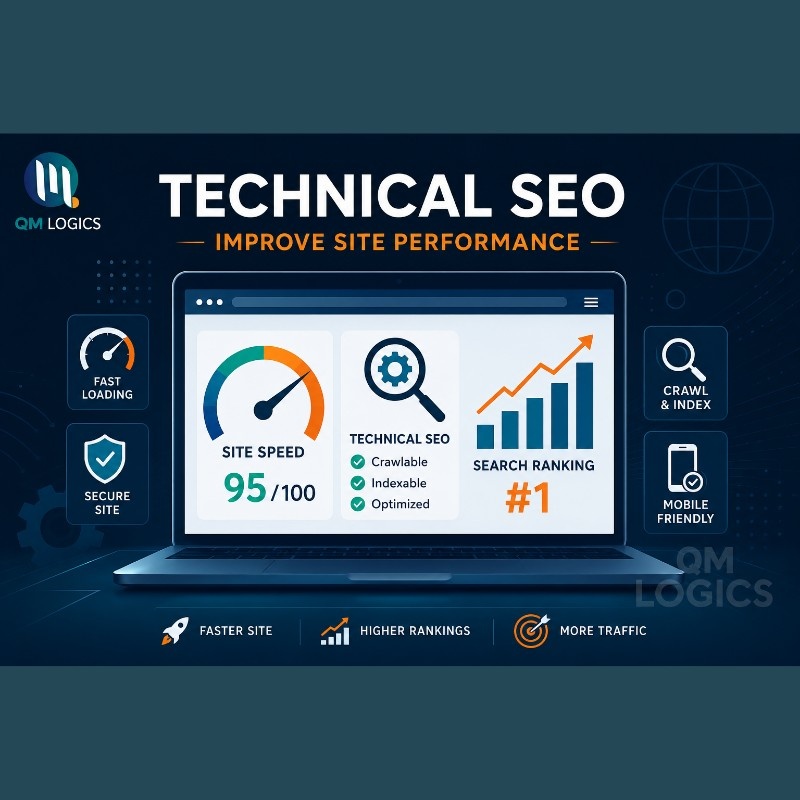
Here’s something I’ve noticed after enough audits: Nobody’s content problem is actually a content problem. It’s a crawl problem, a speed problem, a markup problem wearing a content costume. Fix the technical stuff and the blog posts you already published start ranking on their own. I’ve watched this happen enough times at QM Logics that I’m no longer surprised by it, and honestly, it’s the closest thing to a technical SEO guide I wish someone had handed me years ago.
Search engines aren’t the only audience anymore either. ChatGPT Search, Perplexity, Google’s AI Mode; they’re all reading your site the same way Googlebot does. Can they crawl it? Can they parse the structure? Is there anything worth citing? Miss on any of those, and it doesn’t matter how well-written your page is; it just won’t show up. People are calling this GEO now, Generative Engine Optimization. I think it’s mostly the same job with a new label stuck on top.
Below is the checklist I actually use on client sites, plus the terms you’ll need to make sense of whatever audit tool you’re running, plus a few real examples so this doesn’t stay theoretical. Think of it as technical SEO basics through to the advanced stuff, in one place.
What Is Technical SEO and Why Does It Matter?
Quick answer to what is technical seo: It’s everything that makes your site readable to a crawler: speed, structure, security, mobile behavior, code. Content lives on top of that layer. If the layer underneath is broken, the content sitting on it doesn’t matter much.
I get pushback on this sometimes. Someone will write a genuinely good article and can’t figure out why it’s stuck on page four. 9/10 times, it’s a canonical tag pointing at the wrong URL, or a robots.txt file blocking the exact folder they needed indexed. Fixed a redirect chain on one client’s site last year and crawl errors dropped by over half in three weeks. No new content touched, nothing added, just cleanup.
That’s really the whole argument for the importance of technical SEO in one example. It’s not glamorous work. It doesn’t feel like progress the way publishing a new post does. But it’s the difference between content that gets found and content that sits there. And it’s usually the fastest route to SEO high-ranking results when everything else on a site is already decent, sometimes faster than writing ten new blog posts.
SEO Technical Terms You’ll Actually Need
Audit tools throw a lot of jargon at you, and most of it boils down to a handful of concepts.
| Term | What It Means |
| Crawlability | Can bots reach and read the page |
| Indexability | Is the page allowed into results once crawled |
| Canonical tag | Marks which URL version counts as the real one |
| Structured data | Schema code that tells search engines what a page is |
| Core Web Vitals | Google’s speed and stability metrics |
| Crawl budget | How much of your site a bot bothers crawling |
| Robots.txt | Tells crawlers where they can and can’t go |
| XML sitemap | Your list of important URLs, handed to search engines |
Once these stop being jargon, audit reports get a lot less intimidating.
Canonicalization issue: Just means two URLs are competing for the same ranking spot, usually because someone forgot to set a canonical when they launched a mobile version or an /amp/ page years ago and it never got cleaned up.
Crawl budget waste: It means bots are spending their limited time on pages that don’t matter – filtered product URLs, tag archives, search result pages- instead of the pages you actually want ranked. Once you can translate the jargon yourself, you stop needing someone else to explain your own reports to you.
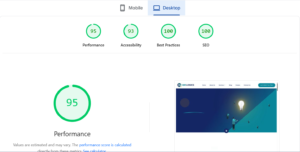
Technical SEO Checklist: The Full List
I’m splitting this into 3 groups so nothing gets buried under everything else. This is also where most technical seo checklist articles stop short, so I tried not to.
Crawling and structure first, since nothing downstream matters if this is broken:
- Canonical tags on anything with duplicate or near-duplicate versions.
- An XML sitemap, submitted through Search Console, kept current as pages get added or removed.
- A robots.txt file that isn’t accidentally blocking pages you actually want ranked.
- 404s found through a crawl and either fixed or redirected, not left to pile up.
- Internal links between related pages, since orphan pages with nothing pointing at them are genuinely hard for bots to find.
- Slugs kept under roughly 70 characters; short and descriptive beats long and keyword-stuffed.
Then the markup layer, the part people skip because it doesn’t show up visually on the page:
- Heading hierarchy that actually nests, no H3 sitting directly under an H1 with nothing between them.
- One H1. Just one. Per page. Multiple H1s confuse search engines about what the page is even about.
- Alt text on every image, not just the handful someone remembered to fill in.
- Schema markup matched to the page type, Article, Product, LocalBusiness, FAQ, whatever actually fits the content.
- Open Graph and Twitter Card tags on the pages that matter most: home, services, product, landing pages, so shared links don’t show up broken or blank.
- A favicon. Takes 2 minutes to add and gets skipped constantly anyway; small thing but it’s a trust signal.
Then speed, mobile, and security:
| Metric | Measures | Target |
| LCP | Load speed of main content | Under 2.5s |
| INP | Responsiveness to interaction | Under 200ms |
| CLS | Layout stability | Under 0.1 |
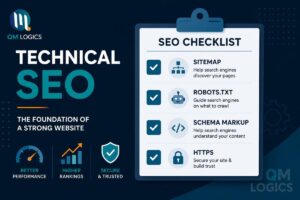
Images kept under 200 KB where you can manage it, since oversized images are the single most common reason LCP scores tank. A mobile version that actually works properly, since Google indexes that first now, not your desktop layout; a lot of site owners still don’t realize this changed years ago. HTTPS with a real, current certificate, not expired, not self-signed, not “we’ll get to it.” This whole section doubles as a solid technical seo best practices baseline even outside a formal audit.
You can see all of these practices in any blog on the QM Logics Blog Page.
Want to skip the scrolling next time you’re running an audit? Download the free checklist PDF here and keep it open on a second screen while you work through your own site.
On Core Web Vitals Specifically
Since this is where most people get stuck, it’s worth slowing down a bit more here.
Why Largest Contentful Paint (LCP) Matters
LCP is just how long the biggest visible thing on your page takes to actually show up, usually a hero image, a banner, or a big heading. Slow LCP is almost always an image problem or a script loading before the actual content does. Compressing images, switching to WebP where you can, and serving files through a CDN usually fixes this without touching a single line of code.
Why Interaction to Next Paint (INP) Matters
INP took over from First Input Delay back in 2024. It’s about responsiveness: Does the page freeze for a beat when someone taps or clicks something? Too much third-party JavaScript is the usual cause here: chat widgets, ad trackers, analytics scripts, the stuff nobody remembers installing two redesigns ago. Large DOM size makes it worse too; more elements means more work for the browser every time someone interacts with the page.
Why Cumulative Layout Shift (CLS) Matters
CLS is the one everyone’s felt without knowing the name for it. You go to tap a button, an ad loads in above it at the last second, and you tap the wrong thing entirely. Setting explicit width and height on your images and video embeds fixes most of this, since it tells the browser to reserve space before the content actually arrives instead of shoving everything down once it loads.
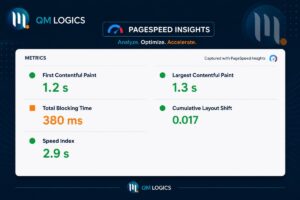
Dropped LCP from 4.8 seconds to 2.1 on an ecommerce site once, just by lazy-loading product images further down the page and cutting two tracking scripts nobody was even using anymore. Took about a week, no rebuild, no new theme.
Two tools worth knowing here: PageSpeed Insights, which blends real Chrome user data with a lab test, and the Core Web Vitals report inside Search Console, which shows how Google actually sees your live traffic over time rather than a single snapshot.
Technical SEO Audit and Review: Types and How to Run One
A technical SEO audit is really just a full health check, usually run with a crawler tool that moves through your site roughly the way a search engine bot does. Not every technical seo review needs to cover everything, though.
There are a few technical SEO types worth knowing so you’re not running the wrong one for the problem in front of you.
Technical SEO Types
- Full audit: Everything on the list; run these quarterly if your site changes much.
- Speed audits: When you just need Core Web Vitals checked without a full crawl
- Crawl audits: When something’s clearly not getting indexed, and you need to know exactly why.
- Content-technical audits: When you suspect duplicate content or thin pages are dragging things down.
You don’t need all four running constantly; pick based on what’s actually going wrong at the time.
Start with Search Console regardless; it’s free, and it’s showing you exactly what Google itself sees, not a third-party approximation of it. Bring in a paid crawler like Screaming Frog once you’re past a few hundred pages; that’s roughly the point where checking things manually stops being realistic for one person to manage alone.
Technical SEO for Ecommerce Websites, With Real Examples
Big catalogs, filtered URLs, products that go out of stock and just sit there indexed forever anyway. Faceted navigation, letting people filter by size, color, or price range, can quietly spin up 1000s of near-duplicate URLs without anyone noticing until crawl budget’s already gone. This is where website technical SEO gets genuinely harder than a simple five-page brochure site, and where most technical seo examples you’ll find online don’t quite match what you’re actually dealing with.
Real example: Had a medical equipment client whose actual product pages were barely getting indexed at all. Turned out filter-generated URLs were outnumbering the real product pages by a wide margin; Google was spending most of its time crawling filtered variations of the same twenty products instead of the products themselves. We added canonical tags across the catalog, blocked the filter parameters in robots.txt, and rebuilt the sitemap around real product URLs only. Indexed pages nearly doubled within 6 weeks. Organic traffic followed the same curve not long after, which is usually how it goes once the crawl problem clears up.

QM Logics has built ecommerce sites with this handled from the start rather than patched in later, a premium watch retailer and that medical equipment platform among them. Building it in from day one is genuinely less work than fixing it after the catalog’s grown to thousands of products.
Best Technical SEO Tools, Services, and When to Bring in Help
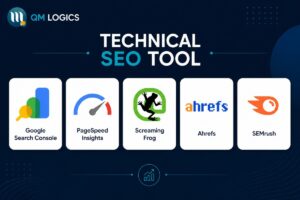
Search Console and PageSpeed Insights, free, no real reason to skip either one. Screaming Frog for crawling and finding broken links across larger sites. Ahrefs or Semrush if you’d rather have technical seo tools bundled in with your keyword research instead of running separate software.
Past a certain size, doing this yourself stops being a good use of your time. A decent technical SEO company or agency audits first, prioritizes fixes by actual impact instead of just working down a generic checklist, and doesn’t break rankings you’ve already earned while making changes. That’s really what technical seo services should mean in practice, not just a report full of red flags with no follow-through.
“QM Logics is a highly professional and dedicated company,” one client told us after we wrapped their audit. That kind of steadiness matters more than usual when you’re touching a site that’s already generating revenue.
How to Do Technical SEO the Right Way
Crawlability first, then speed, then mobile, then security, then markup. In that order, not randomly whichever a tool happens to flag first. Optimizing page speed on a URL Google can’t even crawl yet is just wasted effort; you’re polishing something nobody’s going to see. That’s the honest answer to how to do technical seo without wasting a week on the wrong fix first.
Google’s own documentation on AI-era search says roughly this: Sites that are easy to crawl and clearly organized get surfaced more accurately, in regular search results and in AI-generated answers both. Same underlying mechanism, same reason you’d get cited by a chatbot or not: clean and well-structured pages are just easier for these systems to pull accurate information from.
Conclusion
Technical SEO isn’t one fix; it’s the sum of a lot of small things working together: clean crawling and indexing, a markup layer that isn’t broken, Core Web Vitals sitting inside Google’s targets, a mobile experience that actually holds up, and security that doesn’t scare visitors off before they even see your content. Skip any one of these and the rest of your SEO work, all the content, all the backlinks, ends up carrying dead weight. It also matters more now than it used to, since AI search tools are reading your site the same way Google’s crawler does, so a site that’s easy to crawl and clearly structured doesn’t just rank better; it gets cited more often in AI-generated answers too.
This isn’t something you fix once and forget. It’s maintenance. Run through this checklist every few months, audit after any major site change, and the technical foundation keeps doing its job quietly in the background while everything else you publish gets a fair shot at actually being found. If you’d rather have someone else handle the audit and the fixes, that’s exactly the kind of work QM Logics does for clients day to day.
Frequently Asked Questions
What does technical SEO actually mean?
Fixing the backend, speed, structure, crawlability, security, so search engines can access and properly rank what you’ve already published. It’s not about writing new content; it’s about clearing the path for content you’ve already got.
Content or technical SEO, which matters more?
Neither wins alone, honestly. Good content sitting on a technically broken site still won’t rank, because search engines can’t crawl or index it properly in the first place. And a technically flawless site with thin, unhelpful content won’t rank either. You need both, but technical SEO is usually the one people skip first.
How often should I audit Technical SEO?
Full audit every 3 to 6 months for most sites. Speed checks more often than that, since Core Web Vitals scores shift with every plugin update, theme change, or new script someone adds without thinking about it.
Can I handle Technical SEO myself?
The basics, yes: broken links, sitemap submission, alt text, favicon setup- these don’t need a developer. Schema markup and crawl budget work on larger sites usually need someone who does this full time; mistakes there can be harder to spot and harder to undo.
Does Technical SEO help with AI search visibility?
Yes. Clean structure, fast pages, and clear headings make it noticeably easier for AI tools to extract and cite your content accurately instead of skipping past it for a competitor’s page that’s easier to parse.