 Web Development
 APP Development
 CRM Development
 Digital Transformation
 Generative AI
 QA Testing & Automation
So you’ve been hearing about on-page SEO everywhere. Your competitors are ranking on the first page. Your site? Buried on page four. And someone told you on-page SEO is the fix.
Maybe it is. Maybe it isn’t. That depends completely on what you’re doing? What does your site need? and whether you’re ready to play the long game. This article gives you the clear picture; no sugarcoating, no hype. Just what on-page SEO actually does for your website and where it lets you down.
Let’s get into it.
Benefits of On Page SEO: What It Actually Does for Your Site
Here’s the thing most people miss. On-page SEO is the only type of SEO where you’re in complete control. Every change happens on your own website. No waiting for backlinks. No relying on other sites. Just you, your content, and how well you’ve structured it for search engines and real readers.
And that control? It pays off.
When you nail on-page optimization, Google finally understands what your page is about. Not just your homepage. Every single page. And each page becomes its own ranking asset, pulling in traffic 24/7 without you spending a rupee on ads.
Shopify On Page SEO and Ecommerce: A Real Example That Proves the Point
A Shopify store selling handmade leather bags started optimizing their product pages in early 2024. They added proper alt text to images, fixed title tags, rewrote meta descriptions, and structured their H2 headings around actual buyer search terms. Within 90 days, three of their product pages jumped to page one for “handmade leather bags for men.”
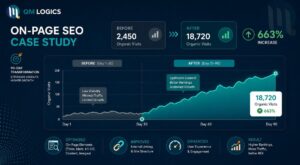
No paid ads. No PR campaign. Just solid on-page SEO for their e-commerce website.
That’s the kind of result on-page SEO delivers when done right. And it isn’t magic. It is structure, clarity, and consistency.
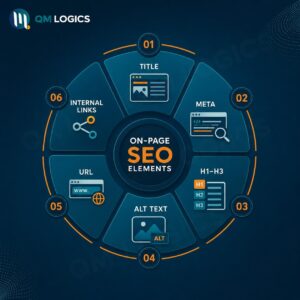
Here’s what on-page SEO actually controls on your site:
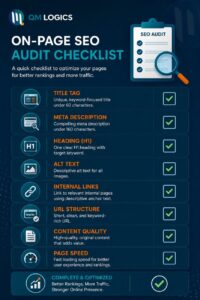
| Element | Why It Matters |
| Title Tag | First signal Google reads; make it count |
| Meta Description | Controls whether people actually click |
| H1 / H2 / H3 Headings | Tells Google your page structure |
| Image Alt Text | Let images rank in Google Image Search |
| Internal Links | Pushes authority to other pages on your site |
| URL Structure | Clean URLs rank easier and get clicked more |
| Content Relevance | The actual foundation on which everything else sits |
Benefits of On Page SEO That Compound Over Time
Paid ads stop the moment you stop paying. On-page SEO keeps working. That’s the fundamental difference.
Every page you optimize becomes a long-term asset. Six months from now, a page you published today could be bringing in ~500 visitors a month without you touching it again. That’s not theory — that’s what consistent on-page optimization builds.
The real benefits worth knowing:
- Rankings that stick without monthly ad budgets draining your cash
- Qualified traffic from people already searching for what you sell
- Better user experience, because clean, structured content keeps people on the page
- Stronger AI visibility; pages with clear stats and direct answers show up in ChatGPT, Perplexity, and Google AI Overviews
According to my research:
“Pages with quotes, statistics, and clear statements have been shown to have 30-40% higher visibility in AI answers.”
That last point matters a lot in 2026. On-page SEO isn’t just for Google anymore. It’s your foundation for GEO (Generative Engine Optimization). If your content isn’t structured clearly, AI tools won’t cite it. Simple as that.
If you’re building a site from scratch and want the SEO structure baked in from day one, QM Logics’ web development services handle exactly that.
On Page SEO Meta Tags: The Part Everyone Gets Wrong
Meta tags are small. Their impact isn’t.
The first thing Google reads on every page is title tags. Your meta description is what that convinces someone to actually click your result instead of the one above or below it. Get these wrong, and you lose customers.
On Page SEO Examples: Good vs Bad Meta Tags
This is a good title tag: “On Page SEO for Ecommerce Websites | Complete 2026 Guide”
This is a bad one: “SEO Page – Our Website”
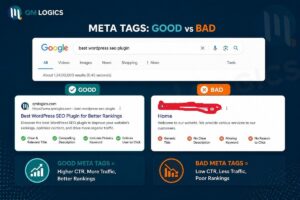
The difference is obvious when you see it side by side. One targets a real search query. The other tells Google absolutely nothing useful.
Keep title tags under 60 characters. Keep meta descriptions under 160 characters. And don’t write them for Google; write them for the person who is about to click. That’s the whole point.
How to Use AI for On Page SEO
AI tools like ChatGPT, SEMRUSH AI, and Surfer SEO, etc., have become part of every serious SEO workflow. They’re genuinely useful for building topic structures, keyword clustering, and finding content gaps.
But here’s where most people go wrong. They let AI write the whole thing. Then they wonder why their content sounds robotic and doesn’t rank.
Advanced On Page SEO Strategy with AI Tools
Here’s what I do:
Use AI for research. Use your brain for writing.
A marketing agency in Austin ran a test in 2024. They used AI to identify 40 semantic keywords around “technical on-page SEO” and built a content brief from those keywords. Then a human writer took that brief and wrote a 2,800-word guide with real examples, in a conversational tone, and genuine expertise woven in.
Result? Featured snippet in six weeks. Not because of the AI. Because of how the human applied the research.
That’s advanced on-page SEO. Not keyword stuffing. Not AI-generated fluff. Real content, structured well, written by someone who actually knows the topic.
On Page SEO WordPress vs Shopify: Which One Gives You More Control
This comes up constantly, and the answer isn’t one-size-fits-all.
WordPress gives you full flexibility. With plugins like Rank Math or Yoast SEO, you control every meta tag, schema type, canonical URL, and breadcrumb. If you publish content regularly and want deep control over your on-page optimization, WordPress is the better platform.
Shopify is easier to start with, but more restricted. It handles some basics automatically, i.e., sitemaps, basic meta fields, but you can’t fully customize URL structures. That’s a real limitation for ecommerce on-page SEO when you’re trying to build a clean site architecture.
| Feature | WordPress | Shopify |
| Meta Tag Control | Full control | Partial |
| URL Customization | Complete | Semi-locked |
| Schema Markup | Plugin-based | App-based |
| Blog Content SEO | Excellent | Basic |
| E-commerce Optimization | Good via WooCommerce | Built-in, limited |
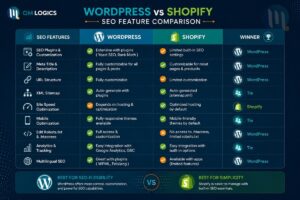
Bottom line: if e-commerce is your main game and you want serious on-page SEO for your e-commerce website long-term, WooCommerce on WordPress gives you more room to grow.
For a detailed comparison, explore our Blog and Contact Us to get the most accurate consultation for free.
Cons of On Page SEO: The Side Nobody Wants to Talk About
Let’s be honest here. On-page SEO isn’t a magic switch. It takes time. It requires maintenance. And it can actually hurt you if you do it wrong.
These are the real cons of on-page SEO that you need to plan around.
On Page SEO for Ecommerce: The Cannibalization Problem
E-commerce sites run into a nasty issue called keyword cannibalization. Say you sell five different running shoes, and you optimize every product page for “best running shoes.” Google now has five pages from the same site competing for the same keyword. Instead of one page ranking well, all five rank poorly.
This is one of the most common and most expensive on-page SEO mistakes in e-commerce. And it’s completely avoidable with a proper keyword mapping strategy upfront.
Other cons worth knowing, according to my research:
- Results take 1 to 3 months minimum, depending on website size. If you need traffic next week, on-page SEO isn’t going to deliver that. Paid ads are faster for short-term needs.
- Over-optimization triggers penalties. Forcing keywords into every heading and paragraph looks spammy to Google. It actually pushes you down, not up.
- You have to keep updating it. Google changes its algorithm constantly. Content that ranked well a year ago can drop if you don’t refresh it.
- On-page alone isn’t enough. Without backlinks and technical SEO working alongside it, even perfectly optimized pages struggle for competitive keywords.
- Google’s HCU changed the rules. The Helpful Content Update specifically targets pages that look optimized but don’t actually help the reader. Thin content with good meta tags still fails.
Technical On Page SEO Errors That Destroy Rankings Silently
Here’s a real story. An online fashion brand lost 45% of its organic traffic in a single month. Not from a Google penalty. Not from a competitor outranking them. A developer accidentally left “noindex” tags on product pages after a site redesign.
Months of ranking progress gone overnight.
That’s a technical on-page SEO mistake, and it’s more common than you’d think. Other technical issues that kill pages include broken internal links, missing canonical tags that create duplicate content, and slow page speed that pushes bounce rates up.
For businesses that want technical site architecture built correctly from the start, QM Logics’ digital transformation services cover exactly this.
Importance of On Page SEO in 2026
Here’s what’s shifted. Google is no longer the only search engine that matters.
ChatGPT has over 800 million weekly active users as of early 2026. Perplexity, Google AI Overviews, and other AI tools now answer questions directly without sending users to websites. To appear in those AI-generated answers, your content needs to be structured clearly enough for AI systems to extract and cite it.
That’s where on-page SEO and GEO overlap. Clear headings, focused paragraphs, direct answers, and real statistics; these aren’t just good SEO practice. They’re now your ticket into AI-generated search results too.
“Your goal in 2026 isn’t just ranking. It’s being the source AI tools trust enough to cite.” — Neil Patel
The importance of on-page SEO has expanded because search itself has expanded. Optimizing your pages well now serves Google, Bing, and every AI tool that crawls your content for answers.
You can see how QM Logics covers this evolving landscape through their blog with content that addresses both traditional SEO and modern AI search visibility.
Conclusion
On-page SEO works. That’s not in question. However, it is suitable for those who approach it as a long-term investment rather than a quick fix.
The advantages are very real: It’s more likely to attract traffic, has less acquisition expenses, is discoverable by AI-powered search, and continues to work without needing a continued ad spend. There are also the cons: slow results, technical risk, constant upkeep, and the fact that having a great on page optimization will not overcome a competitor with 500 good-quality backlinks.
Be aware of what you’re signing up for. Develop correct on page optimization. Stay consistent. Then do audits regularly to not have any technical matters ruin the work you did in a matter of hours. That’s the only thing you’re supposed to do.
Frequently Asked Questions
What is on page optimization? And why it is important?
On page SEO involves optimizing the content and HTML of each web page in order for the search engine to know what the page is about and rank it for the proper search. This is important because it directly influences the visibility of your pages without the need for ads, and it allows you to have complete control over the ranking factors.
What are the negative points in on page optimization?
Long wait times, constant tweaking, potential for over-optimization, and the lack of being able to outperform competitive sites without backlinks and technical SEO efforts. Another example of keyword cannibalization is when two or more product pages are optimized for the same keywords on e-commerce websites.
Does on-page SEO work for ecommerce websites?
Yes, but it’s a different approach to blog SEO. The most common areas to watch for Ecommerce on page SEO are product page titles, schema markup of prices and reviews, the structure of the category page, and avoiding keyword cannibalization between similar products. Both Shopify and WooCommerce offer the benefit of on-page optimization, although in different degrees.
What is the point of time for showing the results of on-page optimization?
It takes 1 to 3 months minimum (depending on website size and type) for most optimized pages to begin to see positive rankings, and even longer for more competitive keywords. Pages that target long-tail keywords with lower competitiveness may get ranked in a shorter period, which is about 4 to 8 weeks minimum. The process is accelerated over time with consistency and regular content updates.
Is it possible to get my content to show up in AI responses with on page optimization?
Yes. Structured content, such as having clear headings, answering directly, using real statistics, and formatting, is cited much more frequently in AI-driven answers, like those from ChatGPT, Perplexity, and Google AI Overviews, than content without these elements. In 2026, the core of AI search visibility is on-page optimization.