 Web Development
 APP Development
 CRM Development
 Digital Transformation
 Generative AI
 QA Testing & Automation

I’ve sat through enough post-mortems on failed Node.js development projects to notice a pattern. Almost none of them failed because Node.js was the wrong runtime. They failed because somebody made a call in the first two weeks, before a line of real code existed, and nobody caught it until the bill came due.
Here’s a number I’ll own as mine, not borrowed from a study: across the client work I’ve personally reviewed, something close to 60% of the Node.js builds that ran into real trouble ran into it for one of four reasons. Wrong workload fit. No architecture plan. Hiring on price instead of judgment. Dependencies nobody ever audited. I’m not citing a paper for that. It’s just what kept showing up, project after project, in my own experience.
This isn’t another “what is Node.js” explainer that recycles the same five paragraphs every site has. I researched the current release line directly off Node’s own changelog before writing this, because half the Node.js content online is still talking about versions that went end-of-life over a year ago. Let’s get into what’s actually current, what goes wrong, and what to check before you hire anyone.
What Node.js Actually Is, and Why It Still Matters in 2026
Node.js is a JavaScript runtime built on Google’s V8 engine. It lets JavaScript execute outside a browser, on a server, which is the whole reason backend developers can now write the same language as their frontend team instead of switching between two completely different ecosystems.
It’s still the most widely adopted backend runtime by a meaningful margin. Node.js remains the most-used web framework in 2025 with 48.7% developer adoption according to the most recent developer survey data, and that figure lines up with what I see in job postings and client briefs every month. SolGuruz
The mechanism behind that adoption hasn’t changed much since 2009: an event-driven, non-blocking I/O model. Older server stacks spin up a fresh thread for every incoming request. Node.js doesn’t. One event loop handles thousands of connections without blocking, which is exactly why chat systems, live dashboards, and streaming platforms keep landing on it instead of something heavier.
What has changed is the runtime itself, and this is where a lot of articles online go stale fast.
What’s New in the Current LTS Line
As of mid-2026, Node.js 24 is the active LTS release, carrying the codename Krypton, and it’s supported through April 2028. With the release of Node.js 24.11.0 “Krypton”, the Node.js 24 line has officially entered Long-Term Support and will continue receiving maintenance and security updates through April 2028. Node.js 22 is still patched but is now in maintenance mode, and Node.js 26 is the experimental Current line that library maintainers should be testing against, not deploying to production yet. NodeSource
A few specifics worth knowing if you’re evaluating a team’s technical depth, because asking about these is a fast way to tell if a developer actually keeps up or is just repeating marketing copy. Node 24 ships with V8 13.6, bringing real engine-level updates rather than just syntax sugar. Node js 24 entices new advancements with the V8 engine update, which introduces features like Float16Array and RegExp.escape(). It also moved to npm 11 and tightened default security meaningfully. Node.js 24 now uses OpenSSL 3.5 with a default security level of 2, enforcing higher cryptographic standards, which in plain terms means weak keys and outdated cipher suites get rejected by default instead of silently allowed. Bacancy TechnologyNodeSource
The most recent point release, 24.16, added something I think is genuinely useful for production systems: crypto.randomUUIDv7(), req.signal on IncomingMessage, and test runner order randomization. The random UUIDv7 addition matters more than it sounds. It generates time-sortable IDs, which makes debugging logs and admin dashboards noticeably less painful than the random UUIDs most teams have used for years. Dante Blog
What’s Actually Inside a Node.js Development Engagement
Clients often assume “Node.js development” means someone writes backend code and ships it. There’s more structure to it than that, and skipping a layer is usually where the wheels come off six months later.
Architecture and API design. Route structure, how services talk to each other, REST versus GraphQL. Lighter projects usually pair Node.js with Express. Larger, more structured builds tend toward NestJS, which enforces more discipline out of the box.
Database integration. MongoDB suits flexible, document-shaped data. PostgreSQL fits better when your data is genuinely relational. Either choice needs to be made around how the data will grow over two or three years, not how the demo looks on launch day.
Real-time functionality. This is where Node.js earns its reputation honestly. WebSockets and Socket.IO make live notifications, collaborative editing, and chat systems feel instant rather than refreshed.
Outside integrations. Payment processors, authentication providers, third-party APIs. In my experience, more security incidents trace back to a rushed integration than to anything in the core application logic.

| Layer | Common Tools | What It’s Actually Responsible For |
| API Layer | Express, NestJS | Connects frontend requests to backend logic |
| Database | MongoDB, PostgreSQL, MySQL | Stores and structures application data |
| Real-Time | Socket.IO, WebSockets | Powers chat, live dashboards, notifications |
| Runtime | Node.js 24 LTS | V8 13.6, npm 11, OpenSSL 3.5 security baseline |
| Packages | npm | Largest open-source package registry available, over 2.1 million packages |
If your product needs user accounts, live updates, or any kind of dynamic behavior, Node.js is usually a sound choice. A static brochure site with no backend logic doesn’t need any of this, and I’d tell a client exactly that even if it meant losing the project. There’s no point building infrastructure nobody needs.
Node.js vs Next.js, Settled Plainly
This question comes up in nearly every consultation call I take, so let’s settle it cleanly. Node.js is a runtime. Next.js is a framework that sits on top of Node.js and React, built specifically for frontend rendering, routing, and SEO performance.
You don’t pick one over the other the way you’d choose between two competing backend languages. Next.js needs a JavaScript runtime to execute at all, and that runtime is Node.js. The actual decision is whether your project needs server-side rendering for SEO and initial load performance. If it does, Next.js paired with a dedicated Node.js backend handling APIs and data is a common, well-tested combination across production apps today.
Installing Node.js; the Practical Version
If you want to test this yourself before bringing in a team, here’s the short path.
- Download the LTS build from the official Node.js site, currently version 24. Skip the Current/experimental release unless you’re specifically testing upcoming changes.
- Run the installer for your operating system.
- Confirm it worked by typing “node -v” and “npm -v” into your terminal.
- Run “npm init” to scaffold a new project and generate package.json.
- Install your first dependency, for example npm install express, to confirm everything’s wired correctly.
One thing worth flagging from the official release notes directly: Many APIs now include improved argument and option validation, making it easier to catch errors earlier; Buffer APIs now throw when attempting to write beyond their length. If you’re upgrading an older Node.js application rather than starting fresh, this stricter validation is exactly the kind of thing that surfaces previously silent bugs the moment you move to Node 24, so budget testing time for that, not just the upgrade itself. NodeSource
Why Node.js Projects Actually Fail
This is the part most agencies skip in their marketing content, because it’s not flattering to admit. I’d rather tell you straight than dress it up.

Picking Node.js for the wrong kind of workload
Node.js handles I/O-heavy, real-time work exceptionally well. It’s a poor fit for CPU-intensive tasks like heavy video processing or dense mathematical computation, where a multi-threaded language genuinely performs better. I’ve watched teams choose Node.js purely because it’s popular, then wonder why performance collapses under a CPU-bound load that was never going to suit a single-threaded event loop.
No architecture plan before the first commit
This is the most common failure I see, by a wide margin. Developers start writing routes and business logic in the same files before anyone has mapped out how data access, business rules, and the API layer should separate. Months later, the codebase is so tangled that a rewrite ends up cheaper than continuing to patch it.
Hiring based on the lowest quote
I understand budget pressure is real. But there’s a meaningful gap between a developer who can make code run and one who writes code that survives real traffic, handles failure gracefully, and doesn’t quietly accumulate technical debt with every sprint.
Letting dependencies go unaudited
Node.js projects lean heavily on npm packages, and that ecosystem is enormous, with over 2.1 million packages at this point. Without scheduled audits, outdated and vulnerable dependencies pile up quietly. Nobody notices until something breaks in production, or worse, until it gets exploited.
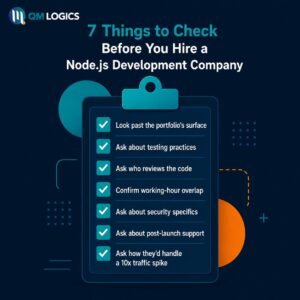
7 Things to Check Before You Hire a Node.js Development Company
Whether you’re hiring a single Node.js developer or bringing on a full team, these are the checks I’d personally run.
- Look past the portfolio’s surface. Anyone can show a clean-looking demo. Ask specifically about projects with real authentication, payment processing, or live features baked in.
- Ask about testing practices. Teams that skip unit and integration testing almost always ship more bugs to production. This correlation holds up consistently in my experience.
- Ask who reviews the code. No internal review process is a quiet but reliable warning sign.
- Confirm working-hour overlap. For US-based clients working with offshore teams, make sure there’s real overlap, not just async status updates that arrive a day late.
- Ask about security specifics. Authentication handling, input validation, dependency update cadence- get actual detail, not a vague “we take it seriously.”
- Ask about post-launch support. Backend systems need ongoing maintenance. If there’s no clear plan for after launch, that gap will show up eventually.
- Ask how they’d handle a 10x traffic spike. Their answer reveals more about real experience than any resume line item.
This is the same checklist we run at QM Logics before taking on any node.js development project. I’ve personally seen what happens on the other side when these steps get skipped, and fixing it later is never cheap.
Conclusion
Node.js was never built to be a guaranteed fix for every backend problem, and I’d be lying if I told you otherwise. What it offers, when used correctly, is a mature runtime backed by one of the deepest open-source ecosystems in software, plus a current LTS line that’s genuinely improved its security defaults and developer experience over the last two release cycles.
The teams that get good outcomes from it plan the architecture before writing code, hire for judgment rather than the lowest quote, and treat security and dependency hygiene as part of the build, not an afterthought tacked on near launch. If you’re weighing whether node.js development services make sense for your next project, ask the uncomfortable questions early. It’s a lot cheaper than discovering the gaps after you’ve already shipped.
For related reading, take a look at our breakdown of web development best practices and our piece on custom enterprise software development, both touch on decisions you’ll likely face during planning. You can also explore our full web development services, or just get in touch if you’d rather talk it through directly.
Frequently Asked Questions
Is Node.js a framework?
No. It’s a runtime environment, not a framework. Express and NestJS are frameworks built on top of it to add structure and conventions.
What is Node.js actually used for?
APIs, real-time applications, microservices, and anything that needs to handle a large number of simultaneous connections efficiently- think chat platforms, live dashboards, and streaming services.
How do I update Node.js without breaking my application?
Stick to LTS releases for production, never jump straight to a Current/experimental version, and test every dependency after a major version bump before deploying. Stricter argument validation in newer releases can surface bugs that were previously silent.
Is Node.js still relevant in 2026?
Yes, and current data backs that up clearly. Node.js accounts for over 35% of global backend runtime usage, making it one of the top three backend platforms worldwide. It’s not a transitional technology, it’s a foundational one at this point.
What’s the difference between Node.js backend work and full stack development?
Backend-only work covers APIs, server logic, and databases. Full stack development with Node.js means JavaScript runs the frontend too, typically paired with React or Next.js.